Everything you own.
One ledger.
Evryday Ops keeps your locations, physical assets, customers, agreements, scheduled payments, maintenance plans, and QR issue reports in one owner dashboard. Built for hands-on operators of apartments, laundromats, car washes, storage, rentals, and mixed asset businesses.
14-day free trial · no card · founding plans from $19/mo
Scan to report.
The ledger, with real work behind it.
The CSS morning ledger above explains the shape of the product. These are real Evryday Ops screens from a safety-checked demo account, shown beside it.
Demo Data — real product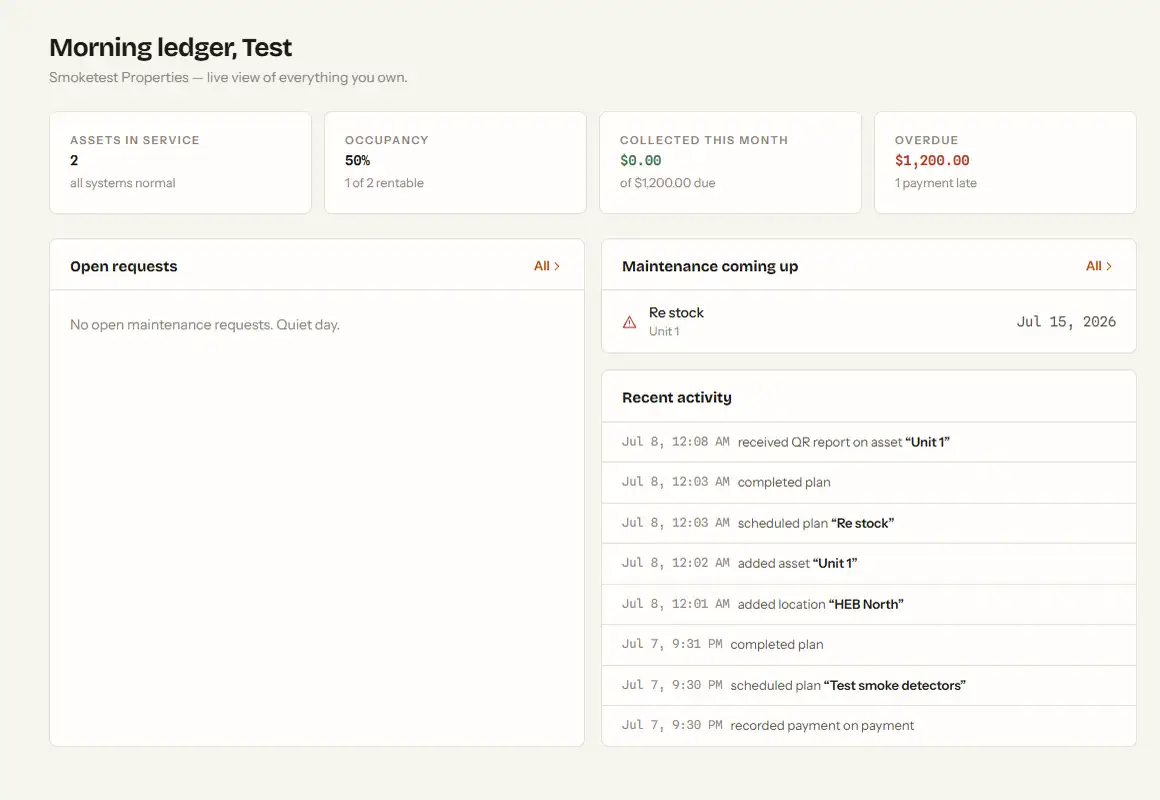
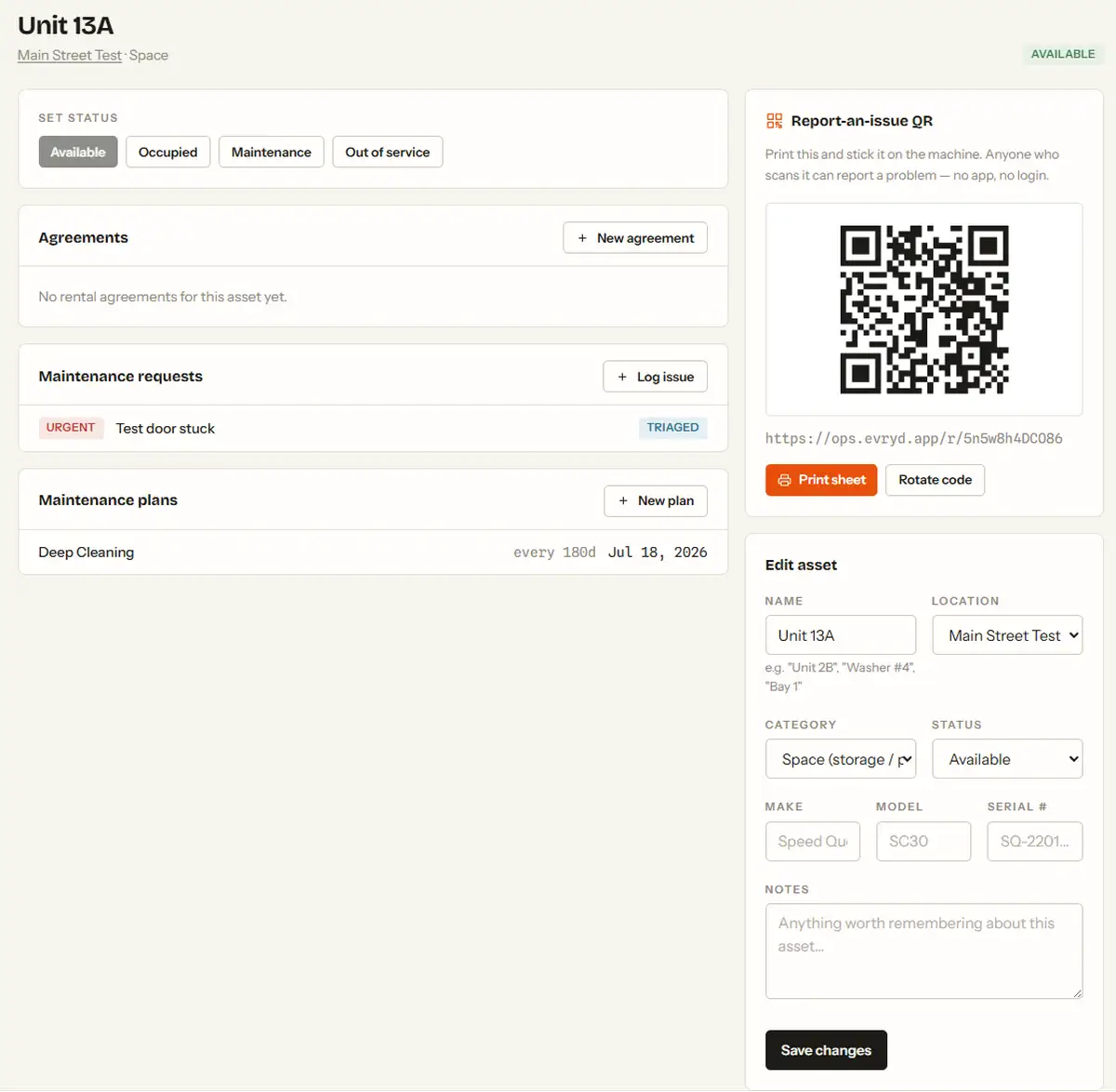
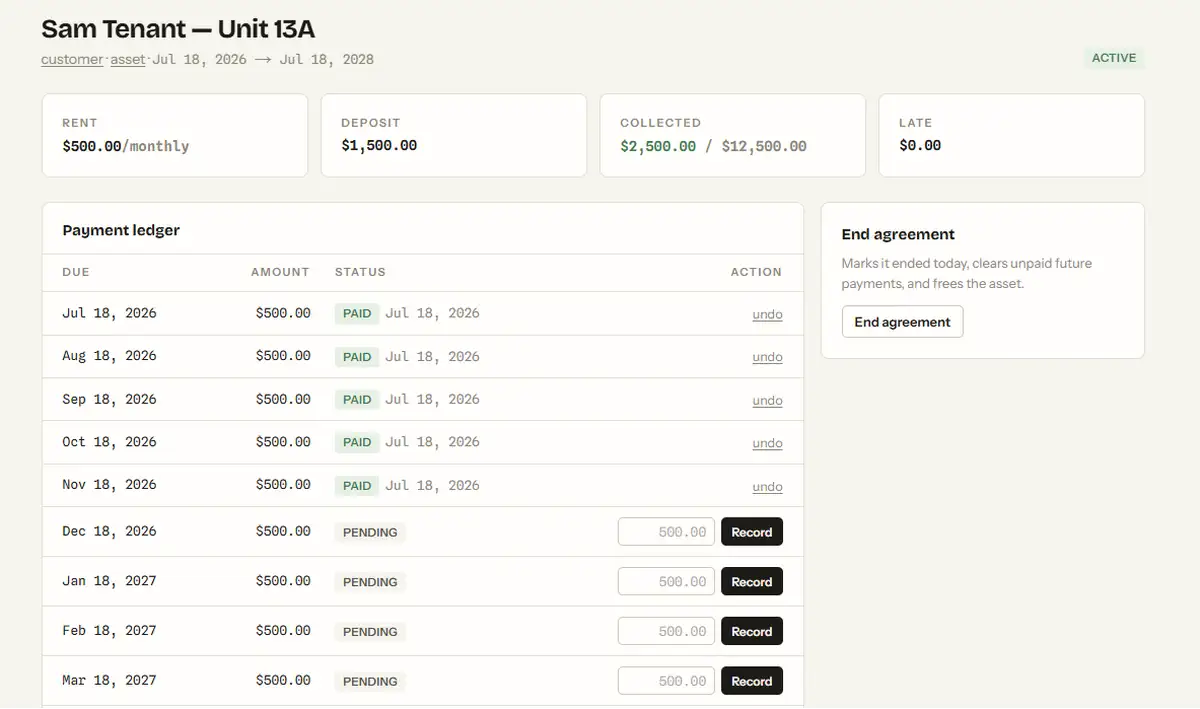
What is Evryday Ops?
Evryday Ops is asset operations software for small-business owner-operators. It answers four daily questions: What do I own? Who is using it? What is due? What needs attention?
Unlike property-only software or maintenance-only software, Evryday Ops connects the commercial record and the physical record: a customer and agreement, a scheduled payment ledger, the asset's current status, public issue reports, and recurring upkeep.
From shoebox of receipts to running a tight ship — in an afternoon.
Put your stuff on the ledger
Add locations (a building, a laundromat, a site) and the assets inside — units, machines, bays. Templates tailor the labels to your business.
Stick a QR on everything
Every asset gets a printable QR code. Anyone who scans it can report a problem in 30 seconds — no app to download, no account to create.
Run it all from one screen
Occupancy, rent due, overdue payments, open issues, upcoming maintenance — one dashboard that tells you what needs attention today.
Tenants report issues by scanning a sticker. That's the whole flow.
No phone tag, no lost WhatsApp messages, no "I told you about this weeks ago." Reports land in your queue with the exact asset attached.
- Printable QR sheets designed to live on doors and machines
- Reporters can leave contact info for updates — or stay anonymous
- Prioritize, comment, and track every issue to resolution
- Rotate a code anytime to kill old stickers
Agreement in. Payment schedule out. Late rent, impossible to miss.
Create an agreement — tenant, dates, rent, deposit — and Evryday Ops generates the full payment schedule. Recording a payment is one click.
- Weekly, monthly, quarterly, or yearly billing
- Overdue and partial payments flagged in red, automatically
- Assets flip to “occupied” and back as agreements start and end
- Any currency — USD, MXN, EUR, and friends
| Tenant | Due | Amount | Status |
|---|---|---|---|
| J. Blake — Unit 5A | Jul 1 | $1,200.00 | paid |
| S. Rivera — Unit 2B | Jul 1 | $950.00 | overdue |
| M. Chen — Unit 3C | Jul 1 | $1,100.00 | partial |
| Storage 14 — L. Ortiz | Jul 15 | $85.00 | pending |
Fix things on a schedule, not when they flood the floor.
Set recurring plans — descale washers every 90 days, test smoke detectors twice a year — and the due-date clock runs itself. Mark it done; the next date is set.
- Per-asset or whole-location plans
- Overdue work surfaces on your dashboard automatically
- Complete history of every service, with notes
in 5d
3d overdue
in 180d
If people use it and you own it, it belongs on the ledger.
One generic core — locations, assets, agreements, payments, maintenance — dressed for whatever you run.
Apartments & rentals
Every unit, every lease date, every rent payment. QR codes on the doors so tenants report leaks instead of letting them rot.
Laundromats
Your machine inventory with make, model, and serial. Descaling schedules per machine, and out-of-order reports straight from customers.
Car washes
Bays, tunnels, and vacuums as assets. Preventive plans keep them spinning; QR codes catch the “bay 3 ate my coins” moments.
Storage facilities
Units, agreements, and monthly billing with overdue flags. Occupancy at a glance when someone calls asking for space.
Vending routes
Machines scattered across town, tracked in one place — with restock-style maintenance plans and public out-of-service reports.
Anything that serves people
Party equipment, parking spots, kiosks, arcade cabinets. If it earns money and occasionally breaks, it fits.
Choose the software that matches the job.
Evryday Ops is deliberately smaller than a full property-management suite and deliberately broader than a maintenance-only system. These pages explain exactly where that makes it better — and where it does not.
Evryday Ops vs Buildium
For owner-operators who need mixed assets, agreements, payment visibility, maintenance, and QR reporting without a full property-management department.
Read the Buildium comparison →Evryday Ops vs Rent Manager
For smaller operations that value a focused daily ledger over deep accounting, customization, portals, and implementation services.
Read the Rent Manager comparison →Evryday Ops vs MaintainX
For assets that have customers, agreements, occupancy, and money due in addition to maintenance requests and recurring upkeep.
Read the MaintainX comparison →Founding plans from $19/mo.
Start with a 14-day free trial. No card required. Founding users keep their founding rate for life.
Starter
For one business with a few places, machines, units, or assets to keep straight.
- 1 business
- 3 locations
- 50 assets
- QR reporting and maintenance requests
- Agreements, rent, and payment ledger
Operator
For owners who run more locations and assets with the same focused operating workflow.
- 10 locations
- 250 assets
- QR reporting and maintenance requests
- Agreements, rent, and payment ledger
- Recurring maintenance plans
Business
For larger portfolios that need a conversation about limits, setup, and rollout.
- Larger portfolios
- Setup and import planning
- Current core owner workflows
- Team and vendor roles are planned, not available yet